Use this forum to submit bug reports for the Midi plugin.
Including a log file with your report increases the chances of receiving quick support. If a log file isn’t included, the initial response will likely be to request one, which can delay the troubleshooting process.
The recommended (and if possible, the required) method to include a log file in a bug report is to use the “Upload log” button in the Stream Deck editor and include the generated log ID in the report. Please do NOT attach the log file to the bug report unless the plugin has completely crashed and the “Upload log” button in the Stream Deck editor is unavailable.
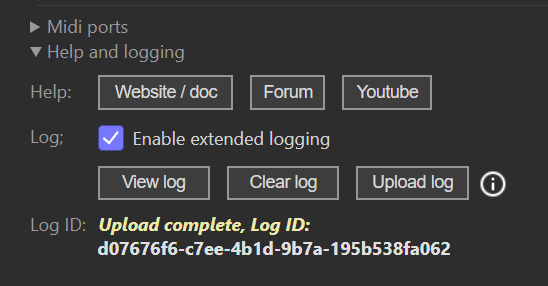
The recommended process for creating a log file is:
- Clear the log file.
- Enable extended logging.
- Quit the Stream Deck software. (This is important; there are things I may need to see that are only happening when the plugin starts)
- In Windows: Right-click the Stream Deck icon in the notification area and select “Quit Stream Deck”.
- In macOS: Left-click the Stream Deck icon in the menu bar and select “Quit Stream Deck”.
- Start the Stream Deck software again.
- Trigger the error situation (…but don’t do much else to keep the log file focused on the case).
- Disable extended logging.
- Use the “Upload log” button in the Stream Deck editor to upload the log file.
- Include the created log ID in the bug report.
If the plugin has crashed, the “Enable extended logging” checkbox won’t work (even if it may appear to), so you’ll need to do it the hard way: create a file named EnableLogging.txt in the plugin folder and add the text “level2” inside it.
- Windows: “%appdata%\Elgato\StreamDeck\Plugins\se.trevligaspel.midi.sdPlugin\EnableLogging.txt”
- macOS: “~/Library/Application Support/com.elgato.StreamDeck/Plugins/se.trevligaspel.midi.sdPlugin/EnableLogging.txt”
Follow the procedure above to restart the Stream Deck software and reproduce the error. Once finished, locate the log file and attach it to the bug report or send it in a PM to @Gunnar.
Plugin log file
- Windows: “%appdata%\Elgato\StreamDeck\Plugins\se.trevligaspel.midi.sdPlugin\pluginlog.txt”
- macOS: “~/Library/Application Support/com.elgato.StreamDeck/Plugins/se.trevligaspel.midi.sdPlugin/pluginlog.txt”