Just purchased Stream Deck (15 key) and your MIDI plugin to build a controller for Reaper and am very excited by what it can do and what I have done so far, but have the following issue.
I have configured a page with buttons which allow me to select a Reaper track using ‘move to next or ‘move to previous’ track, and then for the selected track I have buttons such as Mute or Solo, and a 2 button fader (upper and lower) to adjust level. These all use Mackie/MCU setup, and functionally they all work so I am confident I have the basics setup correctly.
I would like to be able to display the track name on the Stream Deck button and if possible the actual dB value, however I have not been able to achieve this.
From what I have read, it is achievable if using the Mackie protocol, but not maybe not necessarily with Reaper.
I would be happy to display the info on the fader or on a seperate button
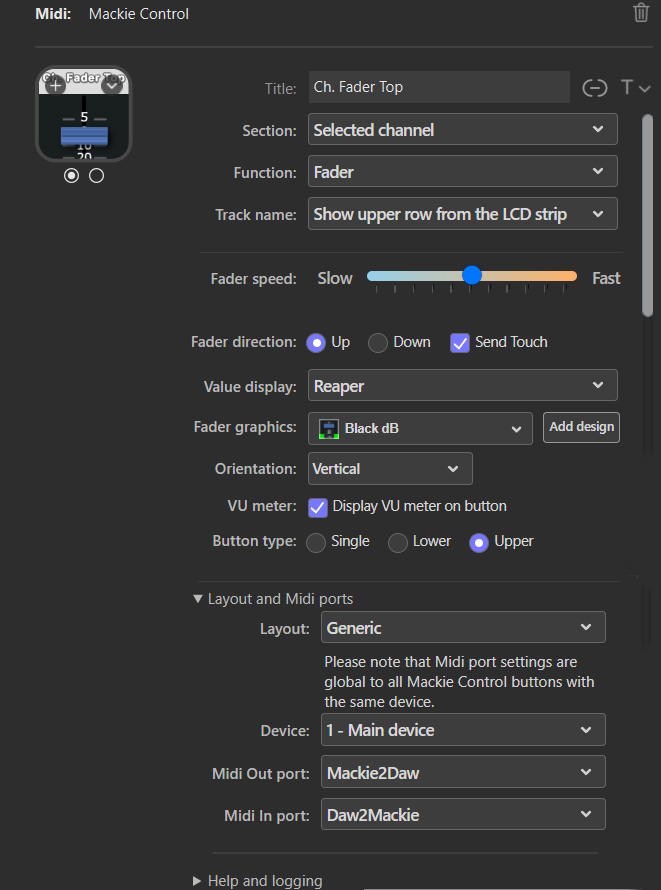
I have attached a partial screenshot showing my top fader config.
A real Mackie Control device has a small 2-row LCD screen for each channel. What is displayed on these two rows depends on the Mackie Control state; it could be channel names, filter information, panning, etc.
The plugin can display whatever information Reaper sends to these two rows, and in the “Track Name” dropdown, you can select whether to show the upper or lower row, or neither.
These two rows are the only target for this kind of information in the Mackie protocol, and if you don’t see the info for either the upper or lower row, I’m afraid Reaper doesn’t send it.
So I have made a little progress. I have installed the Klinke MCU extension in Reaper which provides deeper MCU integration (although I am clearly no expert on this).
I am still unable to get the fader to display track name or level, but if I create a separate Mackie Control button to be ‘Selected Channel’, with Function set to ‘Scribble Strip LCD’, the button will display the track name and the volume level (db). This display dynamically updates when I select either next track or previous track, and this is useful, but does not update the dB level if I adjust the fader.
Also the first time a track is selected, the fader doesn’t appear to know the volume until moved, but this creates a jump. If I move to another track, and then back again, it is remembered. I
Any suggestions, guidance, or advice appreciated - thanks