VS Code base template

I would appreciate your feedback on this, JavaScript wizards out there.

To simplify JavaScript coding as much as possible for new users, I consider including the linked zip file in the package, with instructions to unzip it into the VS Code project folder.

The result will be a template file they can start from, the d.ts file for IntelliSense, and a new snippet file that simplifies function creation. Also included is a set of configuration files to control the behavior of VS Code.

Does this look OK to you? Is something missing or “too much”?

JavaScriptBase

I know some of you reference the d.ts file as it is stored in the plugin folder. I recommend against doing that, since VS Code locks the file, which will cause potential plugin updates to fail. I’m considering removing the files from the ScriptJint plugin folder and only having this zip file in the Extras folder.

Hello,
I’m not sure of what to do with the file you provided.
I unzipped it i where I usually put put my scripts, and as a result i see that :

  • it added the following in my jsconfig.json file.
"include": [
"**/*.js",
"**/*.d.ts"
   ],
  • it created a .vscode folder with two files in it.

Now all my js files report errors: "parameter xxx implicitely has 'any type" and changing /// <reference path="C:/Users/Me/AppData/Roaming/Elgato/StreamDeck/Plugins/se.trevligaspel.midi.sdPlugin/ScriptJint/streamdeck-midi.d.ts" /> to /// <reference path="./streamdeck-midi.d.ts" /> has no effect.

What did i do wrong ?

It seems // ts-check is generating these errors, i changed it to // ts-nocheck and errors disappear.

But now, if i type a function name, it adds the signature and says Signature declarations can only be used in TypeScript files.

[Previously I moved the code snippets file to my %appdata%/Code/User/snippets folder]

and also, typing a function (ex. function OncontrolChangeReceived) inserts two lines, ex;

function /** @type {(channel: MidiChannel, control: number, value: number) => void} */
function OnControlChangeReceived(channel, control, value) {
    
}

with the first one generating an error: Signature declarations can only be used in TypeScript files and function (Missing)(): any

it is quite inconvenient, since i have to remove the first function

OK, thanks.

Obviously, I did something very wrong. Please remove the files added from the zip so your scripts work again.

I will take a new look at this.

Before reverting I ran a few test, changing entries to the following in code snippets :

  "StreamDeck-Midi: OnControlChangeReceived": {
    "scope": "javascript",
    "prefix": "function OnControlChangeReceived",
    "description": "Create OnControlChangeReceived callback",
    "body": [
      "/** @type {(channel: MidiChannel, control: number, value: number) => void} */",
      "function OnControlChangeReceived(channel, control, value) {",
      "\t$0",
      "}"
    ]
  },

  "StreamDeck-Midi: OnControlChangeReceived2": {
    "scope": "javascript",
    "prefix": "OnControlChangeReceived",
    "description": "Create OnControlChangeReceived callback",
    "body": [
      "/** @type {(channel: MidiChannel, control: number, value: number) => void} */",
      "function OnControlChangeReceived(channel, control, value) {",
      "\t$0",
      "}"
    ]
  },

which avoids duplication of the function keyword when typing “function OnControlChangeReceived”.

Two comments :

  • It would be nice to align the parameters description with what’s in the d.ts reference.
    In the above cases what is important is to know that midi channel is “one based” (1-16), for instance, and CC’s are 0-127.

  • Now it is a matter of taste but i’m not found of JSDoc in the js files (which are already much more verbose than midiscripts) and having a proper hover text on functions definition is sufficient in my opinion.
    I tried to get the proper hover from d.ts but I could not, as it seems that for callbacks, typescript intellisense has priority over d.ts content, and shows “any” for parameters types, regardless of the d.ts content.
    Maybe there is a workaround to this, using VS Code HoverProvider API that could source from the d.ts file … but i did not investigate further.

I agree that displaying the “correct” tooltip would be better, but, as you mention, an extension using the HoverProvider API would be required for this. Maybe later…

My goal with these files is to simplify the process for new JavaScript users without disrupting more experienced users.

I have removed the ts-check line because it causes more problems than it solves.

The d.ts file is what it is, I guess.

The snippet file can be created in two versions: with and without the JSDoc addition, so the user can choose which one they want. My suggestion (or rather, CoPilot’s suggestion) is to store the file in the .vscode folder. Is there a better placement?

The settings.json file is a suggestion from CoPilot to make the snippets available in Intellisense more easily. These settings can probably be configured manually instead, and I don’t know the best way to “distribute” this. CoPilot suggests the following content for the file:

{

  "editor.snippetSuggestions": "top",

  "editor.tabCompletion": "on",

  "editor.quickSuggestions": {

    "comments": "on",

    "strings": "on",

    "other": "on"

  },

  "editor.suggestOnTriggerCharacters": true,

  "editor.suggest.showSnippets": true,

  "editor.wordBasedSuggestions": "off",

  "editor.suggest.showWords": false,

  "editor.suggest.showKeywords": false,

  "editor.inlineSuggest.enabled": false,

  "emmet.showExpandedAbbreviation": "never"

}

I’m not a VS Code user and am not familiar with the best way to do this. Is the settings file as described OK, “too much”, or simply not necessary? Is it better to document how to make the appropriate settings manually instead?

Should the files be packaged in a zip, or stored separately, with a documented procedure for how to “implement” them?

I completely ignored the editor settings you and copilot provided. :face_without_mouth:
This is what works for me, including :

  • code snippets (Revised version), with entries like:
  "StreamDeck-Midi: OnControlChangeReceived": {
    "scope": "javascript",
    "prefix": "OnControlChangeReceived",
    "description": "Create OnControlChangeReceived callback",
    "body": [
      "function OnControlChangeReceived(channel, control, value) {",
      "\t$0",
      "}"
    ]
  },

The duplicate function entry when typing “function myfunc” … could be resolved by duplicating each entry and changing the prefix to “function myfunc”, but it is not really usefull in fact.

  • hover on functions sourced from d.ts jdocs, so that we have a consistent signatures representation.

I’m not sure how to distribute but this is the solution recap with as many things as possible within a Trevliga Spel/JS folder - to be unzipped from a provided file, and some additional configuration in Code/user Folder: code snippets + one line to be changed in Code/user/settings.json

Full solution recap

C:\Users\xxx\AppData\Roaming\Code\User\settings.json

Add : "js/ts.tsserver.pluginPaths": ["c:\\Users\\xxx\\Documents\\Trevliga Spel\\JS"]

C:\Users\xxx\AppData\Roaming\Code\User\snippets\

File Purpose
streamdeck-midi.code-snippets Callback snippets, available in all workspaces

c:\Users\xxx\Documents\Trevliga Spel\JS\

File Purpose
streamdeck-midi.d.ts Exact copy of plugin d.ts — typed hover for midi, ui, gvar, etc.
node_modules\ts-plugin\index.js Active plugin — TypeScript always loads from node_modules\
node_modules\ts-plugin\package.json { "name": "ts-plugin", "main": "index.js" }
ts-plugin\index.js Source reference copy — not loaded by TypeScript
ts-plugin\package.json Source reference copy
jsconfig.json "plugins": [{ "name": "ts-plugin" }]
Every *.js file /// <reference path="./streamdeck-midi.d.ts" /> on line 1

How it works

Feature Mechanism
midi, ui, gvar… hover streamdeck-midi.d.ts auto-included by jsconfig
Callback hover (OnTimerElapsed…) node_modules\ts-plugin intercepts hover, returns typed d.ts signature
Snippets streamdeck-midi.code-snippets triggers on callback names

Files content

The following file is to be decompressed in the JS folder :
https://drive.google.com/file/d/10TrdaH–UOmOK03LQUImyHY5tzMCvzi8/view?usp=sharing

It includes the hover hook to source the signature from the d.ts file.

On another machine

  1. Copy JS\ folder as-is (all paths relative)
  2. Copy snippets\streamdeck-midi.code-snippetsCode\User\snippets\
  3. Add js/ts.tsserver.pluginPaths to user settings pointing to the JS folder on that machine

My Lord, that was fantastic! Thanks.

The download link is wrong, isn’t it? It gives me the source code for your MidiScriptMigrator.

Yes, sorry …
Here is the correct link.

… and the recap :

What it does

  • Typed hover for host globals (midi, ui, gvar…) — from streamdeck-midi.d.ts
  • Typed hover for callbacks (OnTimerElapsed, OnKeyPressed…) — via ts-plugin
  • Snippets — callback stubs triggered by name

JS folder — permanent files

File Purpose
streamdeck-midi.d.ts Type definitions — sync when plugin updates
jsconfig.json "plugins": [{ "name": "ts-plugin" }]
node_modules\ts-plugin\ Active TS language service plugin
_template.js Starter script with all callbacks stubbed
Every *.js /// <reference path="./streamdeck-midi.d.ts" /> on line 1

VS Code user folder — per machine

File Entry
Code\User\settings.json "js/ts.tsserver.pluginPaths": ["C:\\Users\\<user>\\...\\JS"]
Code\User\settings.json + suggestion settings
Code\User\snippets\streamdeck-midi.code-snippets Callback snippets

Distribution — JS.zip (in Trevliga Spel\)

Extract into Trevliga Spel\ — Windows Explorer proposes Trevliga Spel\JS\ automatically.

Contents:

streamdeck-midi.d.ts                   → JS folder (auto)
jsconfig.json                          → JS folder (auto)
_template.js                           → JS folder (auto)
node_modules\ts-plugin\                → JS folder (auto)
_vscode\settings-to-add.json          → merge into Code\User\settings.json
_vscode\streamdeck-midi.code-snippets  → copy to Code\User\snippets\

Steps on a new machine:

  1. Extract JS.zip into Trevliga Spel\
  2. Merge _vscode\settings-to-add.json into C:\Users\<user>\AppData\Roaming\Code\User\settings.json, replace <absolute path to JS folder> with C:\\Users\\<user>\\Documents\\Trevliga Spel\\JS
  3. Copy _vscode\streamdeck-midi.code-snippetsC:\Users\<user>\AppData\Roaming\Code\User\snippets\
  4. Reload VS Code

Note:

  • As discussed earlier, the provided code snippets are without JsDoc with the single source for signatures in streamdeck-midi.d.ts, now that we have a working hover.
  • In this version, streamdeck-midi.d.ts is in the zip file with the purpose of being stored within the JS folder.
    Alternatively, it could be distributed with the plugin within the ScriptJint directory or elsewhere (I am not sure whether VS code locks this file or simply watches it - to be tested), but the reference path should then be updated in the template and each js file, so I left it like that for the moment.
  • I’ve added your editor suggestions in ’ settings-to-add.json’ with a few changes.

I’d be happy to know if this works on other machines and obviously let you decide what you intent to do for future distribution.

Great, thanks.

It works on my machine. Some comments:

  • The path to the JS folder seems to work with a generic path:
    “js/ts.tsserver.pluginPaths”: [“${userHome}/Documents/Trevliga Spel/JS/”],
  • The merge action for the settings needs much more detail since merging json files is not that straightforward for users not accustomed to json files. I’ll check if I can create a merge app that does the job.

I gave a try but it does not work here, the hover do not pick the Jdoc from streamdeck-midi.d.ts.

Also my favorite AI says :

"VS Code only substitutes variables like ${userHome} in specific places (tasks, launch configs, a few built-in settings). js/ts.tsserver.pluginPaths is a TypeScript extension setting — its value gets passed as a raw string to the TS server process, which has no knowledge of VS Code variables. It would be treated literally as a folder named ${userHome}/Documents/…, which doesn’t exist.

The absolute path is the safe choice here."

That would be great. I thought about it but it does not seem trivial since you would need to process the <absolute path to JS folder> placeholder.

Well, it works on my system. :thinking: I saw that the “ characters are f*cked up if you copy the string from this forum and paste it into the json file. Can that be why it didn’t work for you? This definitely works for me:

image

I would rename _vscode to .vscode and skip copying snippets and most of the settings merging. Files in the .vscode folder are automatically merged with the global settings when you open the folder, so you don’t need to copy snippets and settings to the global settings manually. This way, these settings aren’t applied when you work on other projects in other folders, which I think is a good thing.

The only thing that, for some reason, unfortunately, does not work this way is the pluginPaths setting, so it needs to be manually added to the global settings file.

The renaming to .vscode works here, but it needs to be placed in Documents/Trevliga Spel and not Documents/Trevliga Spel/JS due to how my workspace is configured (ie. to have all subfolders: midiscripts, images, layouts, … available).

Still it does not work with manual typing "${userHome}/Documents/Trevliga Spel/JS/" here … the hover is broken. I don’t know why.

However, (and that should solve the issue) I now have this script in .vscode as well, which will update the Code/User/settings.json with the proper (absolute) path.

To summarize, it seems to work here with these three files only:

  • Trevliga Spel\.vscode\settings.json — editor settings (workspace-level)
  • Trevliga Spel\.vscode\streamdeck-midi.code-snippets — auto-loaded workspace snippets
  • Trevliga Spel\.vscode\update-vscode-settings.ps1 — sets pluginPaths in user settings (one-time per machine)

… and a forth file : streamdeck-midi.d.ts in the JS directory + the template. For simplicity it could be moved to .vscode as well, provided that we update the reference in each JS file.

Am I correct ?

This is what I have done. I have now everything in one place:

  • settings.json
  • streamdeck-midi.d.ts
  • streamdeck-midi.code-snippets
  • update-vscode-settings.ps1

and the reference path : /// <reference path="../.vscode/streamdeck-midi.d.ts" /> within each file in the JS Folder

and … (I forgot) node_modules in the JS folder, with the ts-plugin folder (2 files), which could be moved as well to the .vscode folder.

Let me know if it’s ok.

Final setup:

Trevliga Spel\.vscode\ — all project tooling in one place:

  • settings.json — workspace editor settings
  • streamdeck-midi.d.ts — type definitions
  • streamdeck-midi.code-snippets — workspace snippets (auto-loaded)
  • node_modules\ts-plugin\ — TS language service plugin
  • update-vscode-settings.ps1 — one-time setup script per machine

JS\ — scripts only, no tooling artifacts. Each JS file references the d.ts via /// <reference path="../.vscode/streamdeck-midi.d.ts" />.

User settings (Code\User\settings.json):

"js/ts.tsserver.pluginPaths": ["C:/Users/<user>/Documents/Trevliga Spel/.vscode"]

This is the only machine-specific setting. Run update-vscode-settings.ps1 once on a new machine to set it.

Why pluginPaths can’t be automated further: it’s a user-only setting — VS Code intentionally blocks it from workspace settings for security. No variables (${userHome}, ${workspaceFolder}) are expanded there.

Zip file to be uncompressed in Trevliga Spel : Here.

I like this. It’s clean and reasonably easy to explain. I guess the ps1 file only works on Windows, but that’s at least half the battle won.

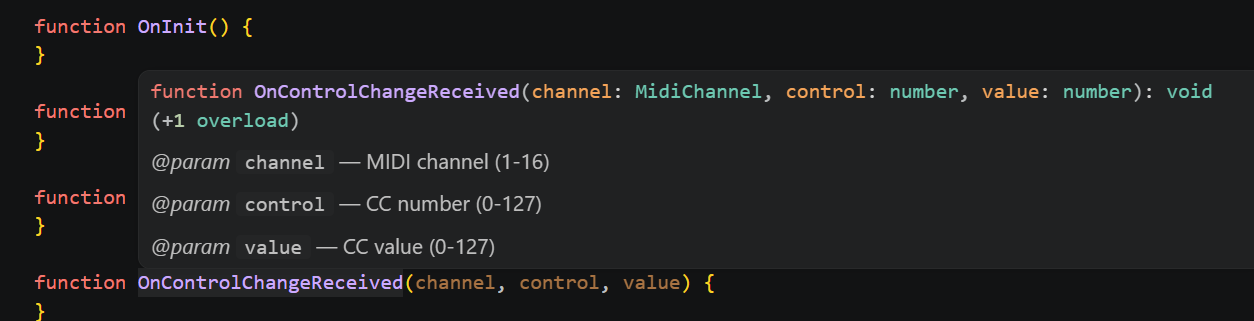
It’s still a mystery about the pluginPath. Just to verify we’re talking about the same thing. This is what I see when hovering over OnControlChangedReceived when using $(userHome)

This is what I see when using $(userHome):
function OnControlChangeReceived(channel: any, control: any, value: any): void, instead of the signature from the d.ts file, which indicates the hover is not working. With an absolute path I see the same thing as you.

However there is a workaround with the ps1 script, which will update with the absolute path (one-time setup script per machine).

It seems Google drive don’t like the dot as a first caracter. Please make sure to save the zip as .vscode.zip in Trevliga Spel before unzipping.

I’m not sure about the .ps1 file. I’m not an experienced VS Code user and don’t use PowerShell often, and I’m a bit puzzled about what to do with it. Trying to execute it in VS Code leads to a path installing PowerShell modules. Executing it outside of VS Code means I need to understand how to execute PowerShell commands.

I find this complicated, and I’m probably much more experienced than many users.

I find it much easier to explain how to add the line manually in the JSON file, a procedure that works the same way on both Windows and Mac.

I need some help from Mac users. What is the best way to package and install the files required for this solution, i.e., the files in the “JS” folder, including the “.vscode” folder, which, on a Mac, is a hidden folder?

If I put everything in a zip (or tar.gz), it unpacks everything into a main folder (not present in the zip), and since the .vscode folder is hidden, it’s not an easy task to move it.