The “uninitialized variables trigger midiScript commands” issue is fixed.
I have a small issue with vPots when the value is “Ableton Live”.
For the track volume it works well, from -ထ to +6.00 dB.
Now they are other controls (Sends A, Sends B, etc. ) for which the range is from -ထ to +0.00 dB.
Could we have a specific entry for these cases or is there a workaround ?
I’m not sure I understand what you mean. What value is “Ableton Live”? Buttons or dials? Generic Midi or Mackie?
It is for scripted dials, when display = Volume bar or Vpot and Value display = Ableton Live.
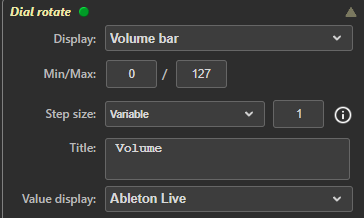
This is correct :
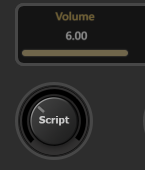
This is wrong :
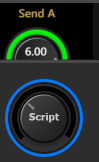
because in this case (Sends), the max value is 0 db.
OK. What you need to do is to make a copy of db127_Live6db.xml place the copy in the folder Documents/Trevliga Spel/dbCurves, and adjust it to your needs. You need to rename the copy slightly so it doesn’t replace the original file in the dropdown.
Check the documentation for tips on how to do this. The heading says “Fader…” but the same files are used for all display types.
Confirmed that the issue is fixed, thanks.
Thank you. I have now two copies in my personnal dBCurves folder and can select them in the editor, where they are prefixed with a *.
But …
I have difficulties to set them programmatically. Now I have : ui.valuedisplay(l_valdisp);
I tried the following values for l_validsp
“Ableton Live Max=6dB”
“Ableton Live Max=0dB”
“*Ableton Live Max=6dB”
“*Ableton Live Max=0dB”
according to the names I have in the files, but it does not change the Value display setting.
Am I doing something wrong ?
The selection must match the dropdown exactly, and the best way to ensure this is to select it in the dropdown and then right-click the dropdown to copy the entry to the clipboard.
I did this, and for some reason I need to investigate, the entry has a trailing blank space that must be included in the script command.
Thanks,
here is a log file with :
- setting it manually
- reverting the change
- setting it programmatically (RotateWP_Selected_Text is not set).
Log ID: 5a8f78f9-0954-46eb-922c-4af8a1c0beb1
Adding the trailing blank does not seem to work either.
Have you right-clicked the dropdown to copy the entry? If you paste what you get, it should work.
Yes, the entry is copied without the trailing blank, and it works now,
Ah, I had mistakenly added a trailing space to the name attribute in the file. 
Great that you got it working.
I also have this layout :
{
      "key": "l_bar_secondary_pan",
      "type": "gbar",
      "rect": [ 5, 60, 190, 20 ],
      "value": 0,
      "subtype": 4,
      "border_w": 0,
      "bar_h": 15,
      "bar_bg_c": "Gray",
      "bar_border_c": "Black",
      "enabled": false,
      "zOrder": 8
    },
but it seems the bar_bgc attribute has no effect, unless i set it programmatically.
is it normal ?
No. Attributes set according to the Stream Deck documentation should of course work when defined in the file.
I can live with it, but I’ll wait for a fix then. Correct ?
Now i have converted nearly all my scripts to js. It was a daunting task but i’m almost done 
As I used Anthropic AI to help me, and out of curiosity I asked him to generate a migration tool. You can find it here
Absolutely not tested on my side but you may have a look if you’re interested.
Have a nice day.
I also have one remaining issue.
[Using WinRT]
When a new version of the plugin is installed, the DAW loses midi communications I don’t know why …
Restarting the DAW usually fixes the problem, but I find it strange, especially since I use BMT in between, so the DAW shouldn’t be impacted at all.
Any idea ?
When you load a layout file, the plugin only passes the file path to the Stream Deck software. Everything after that is handled by the Stream Deck software. If the Stream Deck software doesn’t handle your layout file correctly, there’s nothing the plugin can do about it.
The Stream Deck log may include information about why that property isn’t handled correctly.
I have also experienced similar issues. They started after the MIDI Service was installed. All MIDI connections in the system are handled by the MIDI Service, so I guess the problem is in the MIDI Service.
Looking at the MIDI Service Discord page, there are loads and loads of problems with it. The “May fixes” include fixes for Cubase and WinRT, but I don’t know if it’s exactly these problems. The “June fixes” will actually include an option to disable the MIDI Service. 