Beta version 4.3

Not really. I tried both : WinRT MIDI and the new Midi Service and i did not see much differences (apart from the different BMT port naming scheme).

With the new driver I sometimes ran into situations (it seems after installing a new plugin version) where the Midi service itself was frozen (impossible to stop) and the only solution was a complete reboot, but i did not investigate further (don’t know if it happens also with WinRT Midi).

… and also, a couple of small issues.
After (copy and) pasting a scripted dial in the editor :

  1. it is not possible to expand the sections. I need to select another control and come back to the copied dial to be able to expand the sections.
  2. if i tick the “Keep a single section opened” then, after a delay, the script section opens but with a red dot, and the original script is lost.

… and another issue :
There is no display on a js scripted dial (v-Pot)
Log Id: 3b052b53-97fa-4d14-a2f6-ad9c709ffa80

Dial code :

/// <reference path="C:/Users/LPA/AppData/Roaming/Elgato/StreamDeck/Plugins/se.trevligaspel.midi.sdPlugin/ScriptJint/streamdeck-midi.d.ts" />
const{trsc_Init, trsc_switchView, trsc_DialRotated, trsc_TimerElapsed, trsc_GlobalVariableChanged} = require("./TR_SC_Selected_Dial EMBEDDED.js");
var l_pset = 1; // Half bank #
var cc1 = (l_pset - 1) * 2 + 1;
var cc2 = l_pset * 2;


var l_disp = 0; // 0 = Parameter View, 1=Track View, 2=Scene View
setParamDesign();
var t_trsc = "";


function OnInit() {
    console.warn ("Init");
    t_trsc = trsc_Init(l_disp, true); // Only returns Timer name
    l_disp = 0; // 0 = Parameter View, 1=Track View, 2=Scene View
    setParamDesign();
}
// Switch view
function OnScreenTouched(x, y) {
    l_disp = (l_disp==0) ? 1 : 0;
    switchView();
}
function OnDialReleased() {
    l_disp = (l_disp==2) ? 0 : l_disp+1;
    switchView();
}
function switchView() {
    if (l_disp === 1 || l_disp === 2) {
        trsc_switchView(l_disp);
        return;
    }
    setParamDesign();
}

/*
Switch views
[(tap){@l_disp:#SWITCH(@l_disp,0,1,0)#}{@l_blockupd:0}]
Back to Parameter View			
[(@g_pqb1:2-4){@l_disp:0}{@l_blockupd:0}]Switch in amy case
[(@g_pqb1:1){@l_disp:#IF(@l_blockupd=1,@l_disp,0)#}{@l_blockupd:0}] Switch only if device unchanged
New Device Received
[(@g_chnum0:-1){@l_blockupd:1}] Will always be set event if no device
*/

// Send / Receive midi


// Rotate
function OnDialRotated(ticks, value){
    if (l_disp === 1 || l_disp === 2) {
        trsc_DialRotated(l_disp, ticks, value);
        return;
    }
    // send midi
    midi.sendCC(1, 64+l_pset-1, value);    
}
// Receive midi
function OnControlChangeReceived(channel, control, value) {
    if (channel == 0 && control == 64+l_pset-1) {
        //console.warn("CC " + control + " received, value=" + value);
        ui.text(value);
        ui.value(value);
    }
}


function OnTimerElapsed(tname, isGlobal, time) {
    console.warn("Main timer triggered, tname=" + tname + ", t_trsc=" + t_trsc);
    if (tname == t_trsc) {
        trsc_TimerElapsed(l_disp, tname, isGlobal, time);
        return;
    }
    // Do something else here
}

// TO CHECK
// Make: "g_pqb1" --> "gpqb"+string(l_pset) if needed

function OnGlobalVariableChanged(name, value) {
    console.warn ("Global var ", name, " changed, value= ", value);
    if (name == "g_chnum0" && value == -1) { // New device
        console.warn("Variable " + name + " changed, value=" + value);
        l_disp = 0; // Reset to Parameter View
        setParamDesign();
        return;
    }
    if (l_disp === 1 || l_disp === 2) {
        if (name == "g_pqb1") { // Half bank changed - same device
            l_disp = 0; // Reset to Parameter View and continue
            setParamDesign();
        } else {
            trsc_GlobalVariableChanged(l_disp, name, value)
            return;
        }
    }
    if (name == "g_pqb1") { // can be 0 if no parameters
        rebindParameters(value);              
        //iconleft:#IF(@g_pqb1=@g_pqb0,"none",CONCAT(@g_pp,"PBank-",@g_nhb,"-",@g_pqb1,".png"))#
        ui.iconleft(gvar.g_pqb1 == gvar.g_pqb0 ? "" : gvar.g_pp + "PBank-" + gvar.g_nhb + "-" + gvar.g_pqb1 + ".png");
        console.warn("Variable " + name + " changed, value=" + value + ", ldisp=" + l_disp);
        ui.title(gvar.g_pname[(l_pset-1 + gvar.g_pqb1 - 1)*4]);
        return;
    }

    // Do something else here
}

function rebindParameters(halfBank) {
    switch(halfBank) {
        case 0: return;
        case 1: {midi.sendCC(14, cc1, 0);break;}
        case 2: {midi.sendCC(14, cc1, 127);break;}
        case 3: {midi.sendCC(14, cc2, 0); break;}
        case 4: {midi.sendCC(14, cc2, 127); break;}
        default: console.warn("DP1 Dial js: Unknown halfBank:", halfBank);
    }
}

function setParamDesign() {
    layout.load("");
    // Design is set in editor for V-Pot
    ui.display("V-pot");
    ui.minmax(1, 127);
    // Colors (Not permitted with standard layouts)
    //layout.l_toptext_full_width.color =  "#B8A46E"; // Light Yellow
    //layout.l_toptext_left_icon_present.color = "#B8A46E"; // Light Yellow
}


Note it happens also after a copy and paste. If i recreate the scripted dial from scratch, the vpot get displayed normally.

I guess ChatGPT can do a decent job converting a single script, but asking it to create code that can convert any script with the same finesse is another thing. I’m on my way, though…

Was this when using the MIDI Service option in the plugin? I have seen Cubase lock up when using the MIDI Service, but I don’t know if it’s related to how the plugin connects.

I can’t reproduce this. Is this for a specific dial, or in general? I have the same Stream Deck version as you, so it’s not an SD software issue. If you can reproduce it, please track it in a log file.

I see in the log file that color information for the texts are lost for some reason. The plugin has problems converting color strings (that should be in the format #rrbbgg), and I assume that is why the display fails.

This problem is in the “should be impossible” area, but it obviously happens. From the contents of the color parameter (“undefined”) it seems as if the editor/plugin communication has failed, causing real data to be lost, but it’s a mystery what has happened. If this dial is the same as for the previous issue, the cause (lost data) could be the same.

It happens on all dials I tested, this one with a legacy script.
log Id: 423d56fc-8b61-4a16-ae6b-f3c2cff4a272

What, exactly, did you do when that was logged?

I can see that odd things happen, but I can’t see why. At the end of the log, the plugin suddenly (after 2.8 seconds of inactivity) sends data to the editor. There is no obvious reason why this happens.

The editor’s response is even stranger, as it appears to include uninitialized fields.

No matter what I do, I cannot replicate this behavior. I don’t know if it’s a side effect of how you handle the editor or what is going on. If possible, could you give me a description of how you do this, on an extremely detailed level? Like “open dial A in editor, right click the dial, with the editor open and select copy, right click (not left click) the next dial and select paste”… and so on. It may be at a level where it matters which mouse button you press when, and what state the editor is in when you do it.

Here is the sequence of events :

  1. Clic on an existing dial (with a script file)
  2. Enable extended Loging
  3. Clear the log
  4. [right clic]Copy the existing dial
  5. Clic on an empty dial slot
  6. [right clic] Paste on the empty dial slot
  7. Clic on on the script section
    (nothing happens)
  8. Check the “Keep a single section open” option
    (at this stage the script section opens but the “Load script from file” option is unchecked and there is no script file)
  9. upload the logfile

Log ID: 0a0a7387-0063-4900-b1a2-2dbfe2f8c7ca

Surprisingly, if i upload the log file after step 7. everything goes back to normal.
Log Id in this case: 735107df-9b20-47a4-b83c-b8353689de9a

Not a big deal, we can live with it but I wanted to report.

… and should you need it, another log where the issue disappear after uploading the log file.
d3776fd5-aef9-427f-b3fc-ed8f3a205213

Something happens that destroys properties, and for me, that’s a big deal. :frowning_face_with_open_mouth:

I have managed to reproduce the problem by replicating your script, and I get both the color string exceptions and the editor unresponsiveness.

It has something to do with how (init) commands are handled. I don’t think it’s that script in particular; it’s something wrong with how the plugin executes the init commands. Now I have a chance to find the cause when I can reproduce the issue. :grinning_face:

I’m running the last beta since it was uploaded. Yesterday I had a weird behaviour of all my scripted buttons that didn’t detect that Cubase was running. I accidentally push the “Clear log” button so I couldn’t upload nothing.

Restarting the SD editor fixed the problem. Today I can’t reproduce it.

I guess the problem was that the plugin was not aware of a change of variable in the init condition:
[ (init) (variableValueCondition) {actions} ]

Please consider to add a confirmation dialog when a user press “Clear log“ to prevent accidental erasures.

That’s a good suggestion.

I have bought a brand new SD+XL this week. It’s awesome, very good device. Everything is working as expected.

I am editing/changing several midiScript files, mainly for dials.

I am experiencing the following issue (last beta of the Midi plugin, last release of the SD editor).

I have added the following code at the beginning of one background script, to define the default pitchbend value for an audio soundcard channel:

[(init) {@TMpbMIC:5}]

I have the Advanced Settings of the Midi plugin like this:

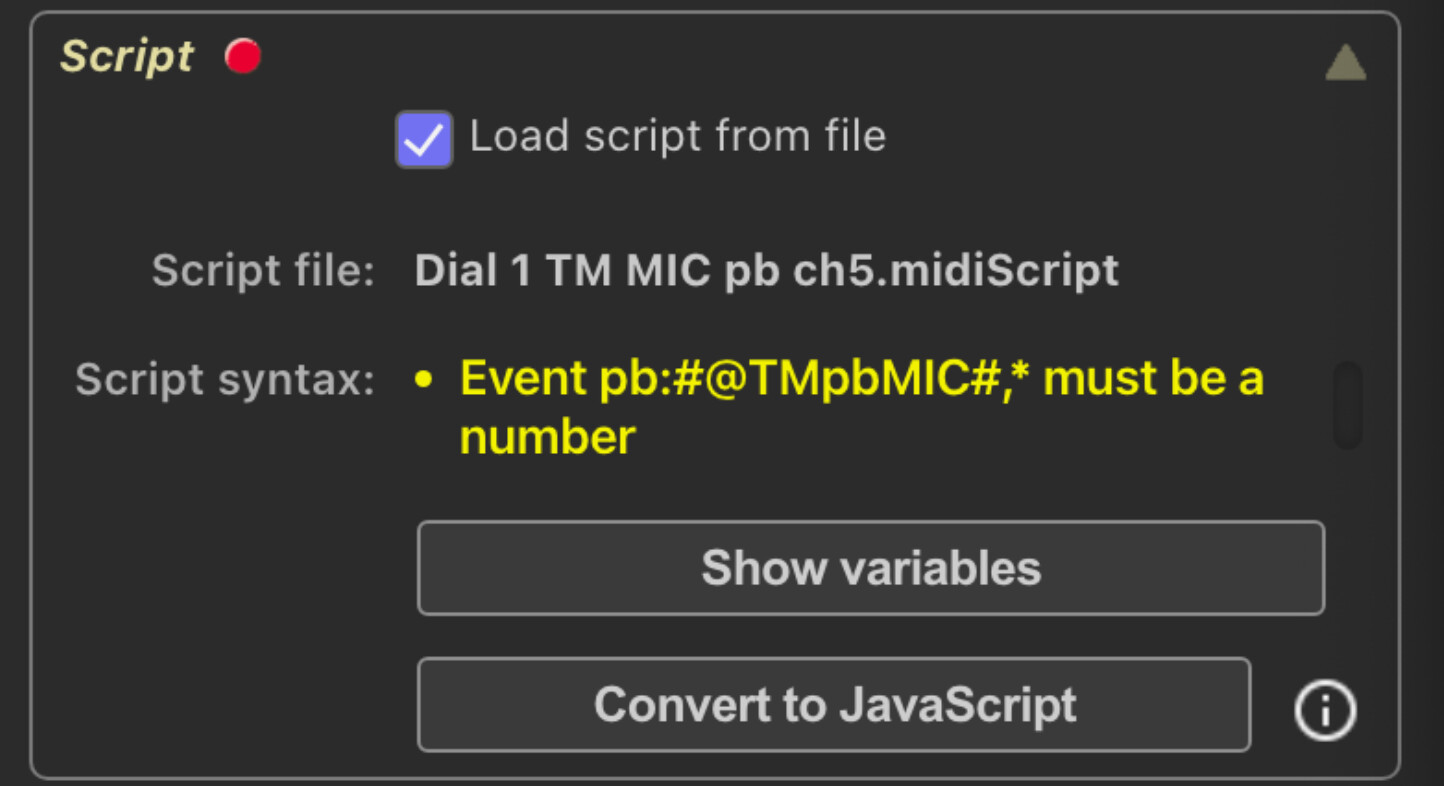
The following code gives the following error:

The error is fixed if I remove the ## from the pitchbend event:

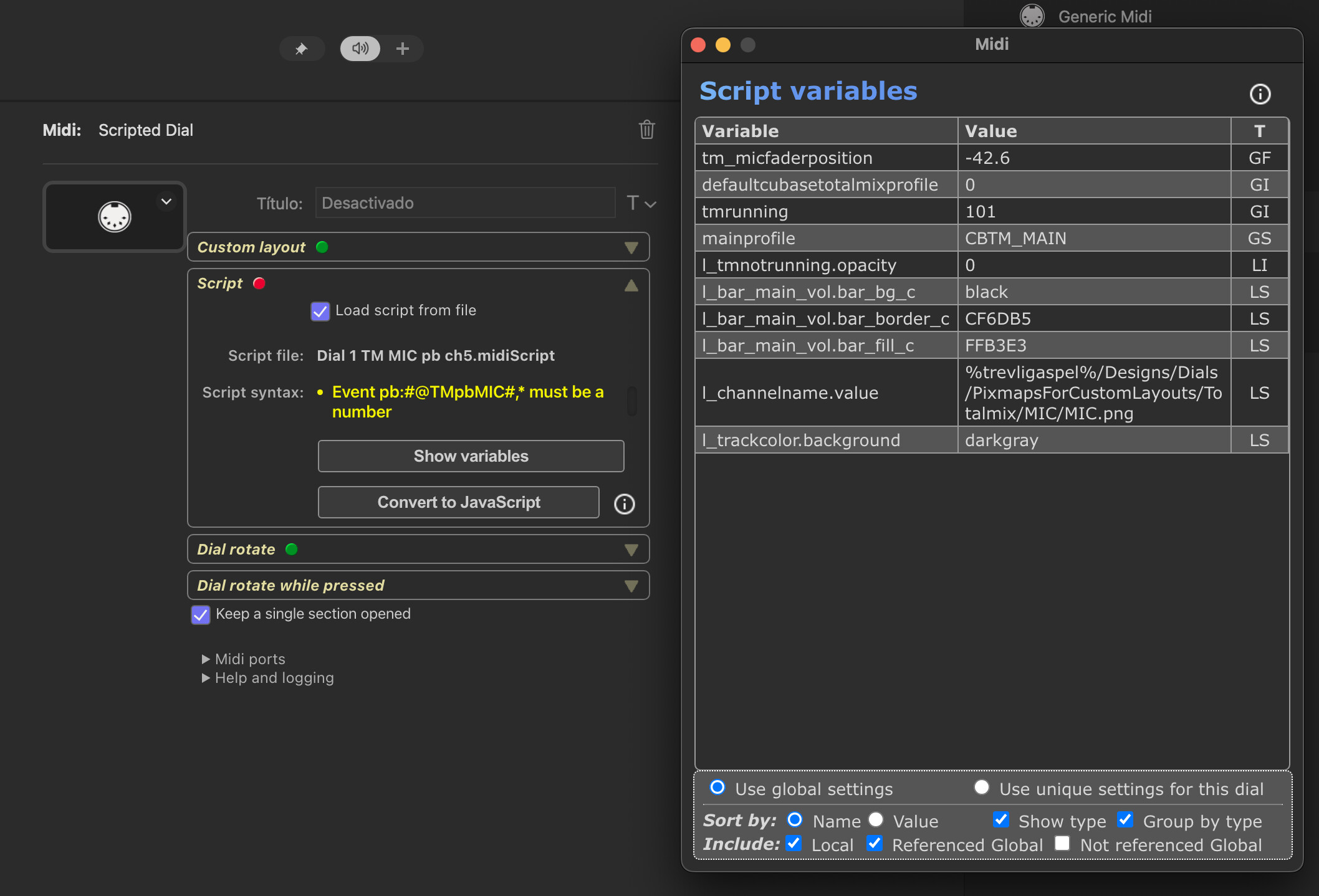
The other weird issue is that in both cases (with the error and wihout it), the variable “@TMpbMIC” is never shown in the Variables window when I select the “Referenced Global” option:

The variable “@TMpbMIC“ is only shown when I select the “Not Referenced Global“ option.

I have restarted the SD Editor and the issue of the variables window persists.

I have unplugged and plugged again the SD+XL and the issue of the variables window persists.

I have this line of code:

[(init+) (@TM_FM93faderPosition:*) {text:#DECIMALS(@TM_FM93faderPosition,1,true)#}

I think this code should always show numbers in x.x format

When the numbers are 1.2 or 4.5 or -12.4 is shown correctly, but when the numbers are 6.0, 1.0 or -3.0 the numbers are shown like 6, 1, -3.

Is the code correct to show always the first decimal, or there is a bug in the math?

Edit: removing the hashtags doesn’t fix it

There was a bug in my head. Floating-point values don’t store display properties.

A floating-point variable with the value 6.23 can be changed to 6.2, but a variable with the value 6 will remain 6 no matter what I do.

The only way to resolve this issue would be to return a string instead of a floating-point number, but that would likely be a breaking change.

Yes, # characters are never used in events.

Found it. Variables referenced in events were not properly identified using lower-case, so the plugin didn’t recognize them as referenced.

Very good sentence for starting a song :grinning_face_with_smiling_eyes:

Well noted.
Can you think of a formula that I can do in the code to check if the number has no decimals, convert it to text and add the string “.0”?
How can I do that?

It’s true, I didn’t remember.

Suggestion: If the midi plugin engine detects # characters in the events, show in the editor that these characters are not allowed.

Now it is sating “Event pb:#@TMpbMIC#,* must be a
number“ for this type of error.
It would be more clear to say something like: “Event pb:#@TMpbMIC#,* must be a
number and # characters are not allowed for referencing variables“

{text:#IF(@l_var = INT(@l_var),STRING(@l_var) + ".0",STRING(@l_var))#}
1 Like

I’ll see what I can do.

1 Like

mmmhhhh, it’s not working…

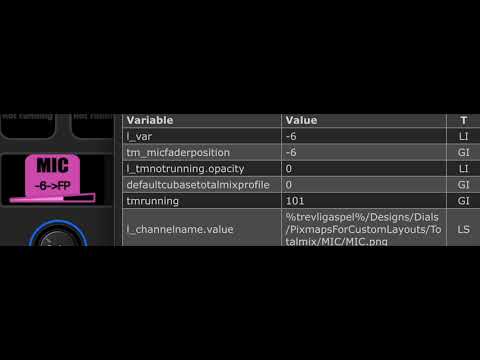
I have been trying the function VARTYPE to get when the number is INT or FP, but it seems that the INT condition is not recognized by the function.

This is the code:

This is the video of the behaviour. You can see that VARTYPE detects correctly the type STR or FP, but not the INT:

Let’s take this code, where the var TM_MICfaderPosition comes from a background script:

When I move the scripted dial and the value received is an integer, the l_var and the g_var are shown as floating vars.

In the other hand, this second code works as expec@TMrunninged:

Video of the 1st code:

Video of the 2nd code: