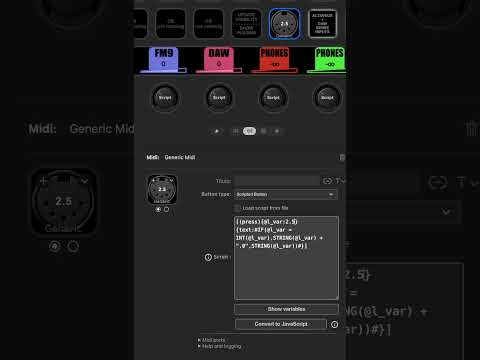
If I set l_var to 2.5, it displays “2.5”; if I set l_var to 2, it displays “2.0”. If your variable isn’t an exact integer, you may get a better result if you also include ROUND() in the formula. Something like this:
The only thing I can think of that can differ between OSs is how the values are represented at the low level. If macOS stores the value “2” in a way that isn’t exactly an integer, it could explain the behavior. If that’s the case, the version with ROUND() should fix it.
Hello,
A quick question today. (Javascript)
It seems that function OnGlobalVariableChanged(name, value) is fired even when a variable value has not changed, which is generating considerable useless calls.
Seel log extract below :
2026-04-14 13:21:18.1192      4,81ms  WARN   101  ScriptEngine_JS  console.warn                  [BackgroundScript2 BCC seting variable:g_t_img_idx from 1 to 1]
2026-04-14 13:21:18.1193      0,15ms  WARN    61  ScriptEngine_JS  console.warn                  [fa3801c916ce37c5acd2da7a0cfc0df0 DP: l_pset=4, Global var  g_t_img_idx  changed, value=  1]
2026-04-14 13:21:18.1194      0,03ms  WARN    24  ScriptEngine_JS  console.warn                  [9b4a5357562d2a3154fff1c37fd5bcee DP: l_pset=3, Global var  g_t_img_idx  changed, value=  1]
2026-04-14 13:21:18.1194      0,02ms  WARN    82  ScriptEngine_JS  console.warn                  [b7ce4099aa30086a7c50f3c2768cf48e DP: l_pset=1, Global var  g_t_img_idx  changed, value=  1]
2026-04-14 13:21:18.1194      0,04ms  WARN   131  ScriptEngine_JS  console.warn                  [dfbece9bdc203928f5fffaf6555fe65f DP: l_pset=2, Global var  g_t_img_idx  changed, value=  1]
2026-04-14 13:21:24.5641   6444,70ms  WARN   123  ScriptEngine_JS  console.warn                  [c8fb715cd893237f5f769c141da83cf9 DP Dial: Setview)]
2026-04-14 13:21:24.7166    152,45ms  WARN   101  ScriptEngine_JS  console.warn                  [BackgroundScript2 BCC seting variable:g_dev_on from 127 to 127]
2026-04-14 13:21:24.7170      0,41ms  WARN   131  ScriptEngine_JS  console.warn                  [dfbece9bdc203928f5fffaf6555fe65f DP: l_pset=2, Global var  g_dev_on  changed, value=  127]
2026-04-14 13:21:24.7170      0,01ms  WARN    24  ScriptEngine_JS  console.warn                  [9b4a5357562d2a3154fff1c37fd5bcee DP: l_pset=3, Global var  g_dev_on  changed, value=  127]
2026-04-14 13:21:24.7170      0,03ms  WARN    61  ScriptEngine_JS  console.warn                  [fa3801c916ce37c5acd2da7a0cfc0df0 DP: l_pset=4, Global var  g_dev_on  changed, value=  127]
2026-04-14 13:21:24.7170      0,00ms  WARN    82  ScriptEngine_JS  console.warn                  [b7ce4099aa30086a7c50f3c2768cf48e DP: l_pset=1, Global var  g_dev_on  changed, value=  127]
Is it normal ? and if yes is there a way to prevent this. (Of course apart from testing every variable before setting it)
Thank you.
I guess it’s something in the functions library that tries to convert it to a number, and the notation “.0” is treated as an error. Why you get an error and I don’t is a mystery, but it’s probably based on the decimal point/comma definition in the language settings.
That was a tricky one. I’ll explain the background:
I first implemented VARTYPE as a normal function in the functions library, but found out that it didn’t work as expected. When the functions library is invoked, the very first thing it does is to convert all numeric variables to floating-point. This meant that the variable sent to the VARTYPE function was always a FP regardless of the “real” type.
To bypass this issue, I had to implement the VARTYPE function outside of the functions library and handle it separately. Because the functions library works the way it does, I had to implement this as a separate call to my own VARTYPE instead of calling the functions library. This means that to call “my” VARTYPE function, it must be the only thing present within the # characters. If VARTYPE is a part of a larger expression, the function in the functions library is used. (I should actually remove that one, so you get an error message instead of a faulty string).
So, since your VARTYPE call is in a larger expression, it will use the function library function, which cannot detect INT. If you split the functions like this, it works:
I believe many of your problems come from the “HashNotNeeded” keyword you have added. I don’t know why you use that, since you seem to have hashes in your actions. I consider that functionality experimental (at best), and if you don’t explicitly need it, I suggest you remove it.
Without that keyword, the plugin knows the text is not an expression and treats it as simple text. With that keyword present, the “expression” is sent to the functions library in case there is something to do with it, and then you have this value transformation taking place in the functions library.
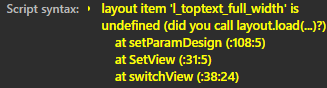
Yes, that’s a problem. The JavaScript layout object needs to read the layout file to retrieve the defined objects. When you call to load the default layout, the layout object doesn’t know which layout it is, so it can’t read it. I’ll see if I can solve that somehow…
Ok, but since I call layout.load(""); and ui.display("V-pot"); , I think the JS layout object should revert to the standard layout provided with the plugin : ts_vpot.json
Should I put ui.display("V-pot"); first as a temporary (or not) workaround ?
And also, after layout.load(""); and ui.display("V-pot");, if i switch to another display on the editor (ex. “Fader”), the plugin keeps a previously assigned custom layout (for faders) despite the “custom layout” option being unticked.
That’s seems strange, maybe the same bug ?